How Computers See Images
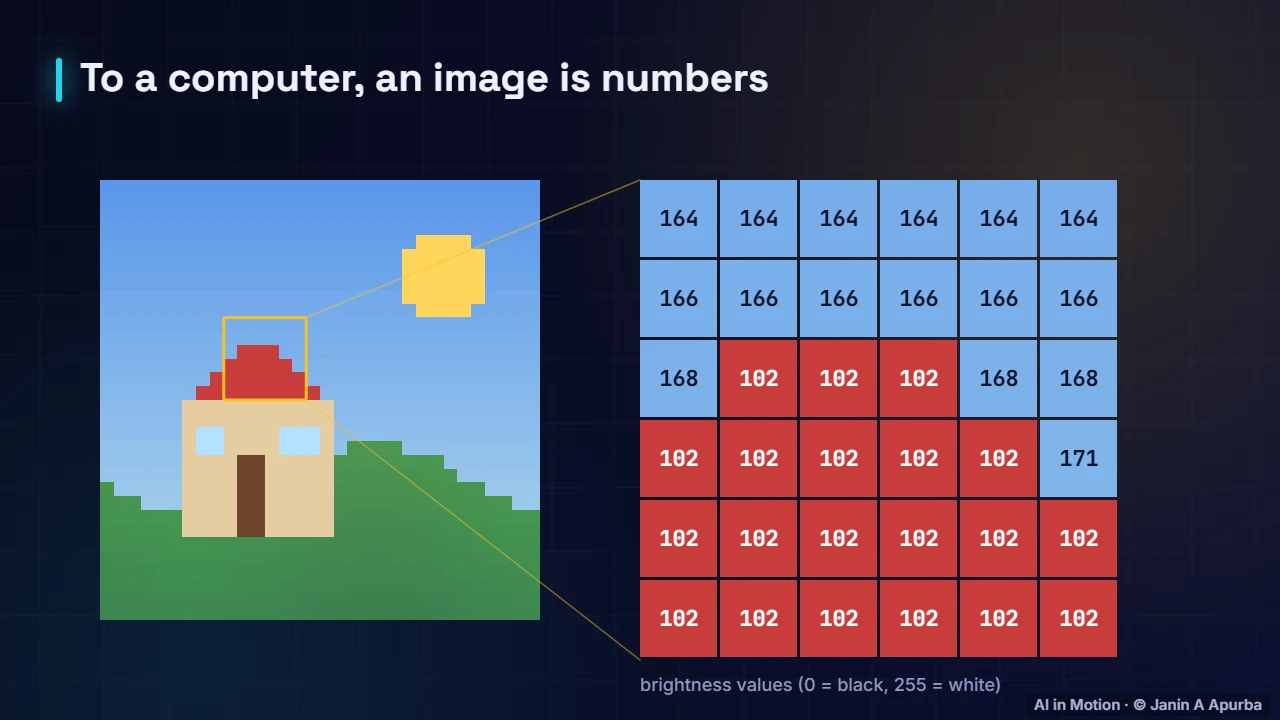
To a computer, a picture is a grid of numbers. Zoom into the pixels, read their values and split a colour image into red, green and blue channels.
📄 Illustrated notes · every chapter as a picture · printable
Quick quiz
3 questions to check your understanding.
Go deeper
University-level written lectures in The AI Lecture Hall:
Transcript
Introduction. You see a house, the sun and green hills. A computer sees none of that. It sees a grid of numbers. Computer vision is the science of turning those numbers into understanding.
Pixels are numbers. This small image is 32 by 32 pixels. The yellow box zooms into a six by six patch. Each square is one pixel, and the number is its brightness, from zero for black to 255 for white. The whole image is just a table of numbers like these.
Colour channels. Colour images store three numbers per pixel: how much red, green and blue light to mix. So a colour image is really three grids stacked together, called channels. A 32 by 32 colour image holds 32 times 32 times 3, which is 3072 numbers.
Why it is hard. Why is this hard? The same cat photographed from a different angle, in different light, or half hidden behind a sofa, produces completely different numbers. A vision system must see past all that variation.
Main tasks. The main tasks build on each other. Classification labels the whole image. Detection finds and boxes each object. Segmentation labels every pixel. And there is much more: pose, depth, tracking and reading text.
Recap. To recap. Images are grids of numbers. Greyscale uses one value per pixel, colour uses three channels. And vision systems must cope with endless variation in angle, light and occlusion.