Convolution and Image Filters
Slide a small grid of numbers over an image, multiply and add. See edge-detection, blur and sharpen filters computed cell by cell.
📄 Illustrated notes · every chapter as a picture · printable
Quick quiz
3 questions to check your understanding.
Go deeper
University-level written lectures in The AI Lecture Hall:
Transcript
Introduction. Blurring a photo, sharpening it, finding its edges, and even the first layers of deep networks, all use one operation: convolution.
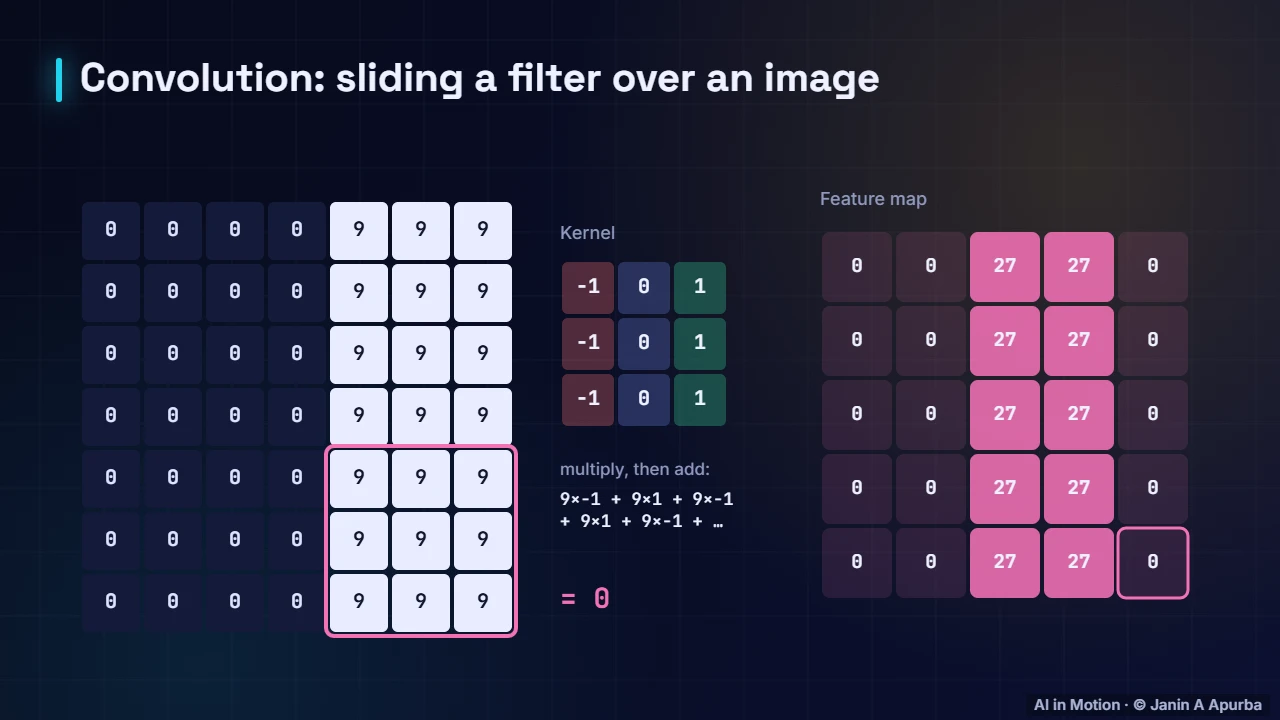
An edge filter. The image on the left is dark on the left and bright on the right. The kernel is a three by three grid of numbers. We place it over a patch, multiply each pair of numbers, and add them up. Then slide one step and repeat. The feature map lights up with 27s exactly where dark meets bright: the filter has found the edge.
Blur. Now a blur filter: every weight is one, and we divide by nine, so each output is the average of its neighbourhood. The sharp jump from 0 to 9 becomes a gentle ramp: 0, 3, 6, 9.
Sharpen. A sharpen filter does the opposite. It boosts the centre pixel and subtracts its neighbours, exaggerating differences. Around the edge we get minus 9 on the dark side and 18 on the bright side, making the edge stand out.
Key ideas. The key ideas. A kernel is a small grid of weights. At each position we multiply and sum. Different kernels find different patterns. And in convolutional neural networks, the kernels are learned from data, not designed by hand.
Recap. To recap. Slide, multiply, add. Edge kernels respond to brightness changes, blur averages, sharpen exaggerates. And CNNs learn their own kernels.